
CarbonGuru Embedded Merchant Offsetting is now available in the official WordPress plugin directory.
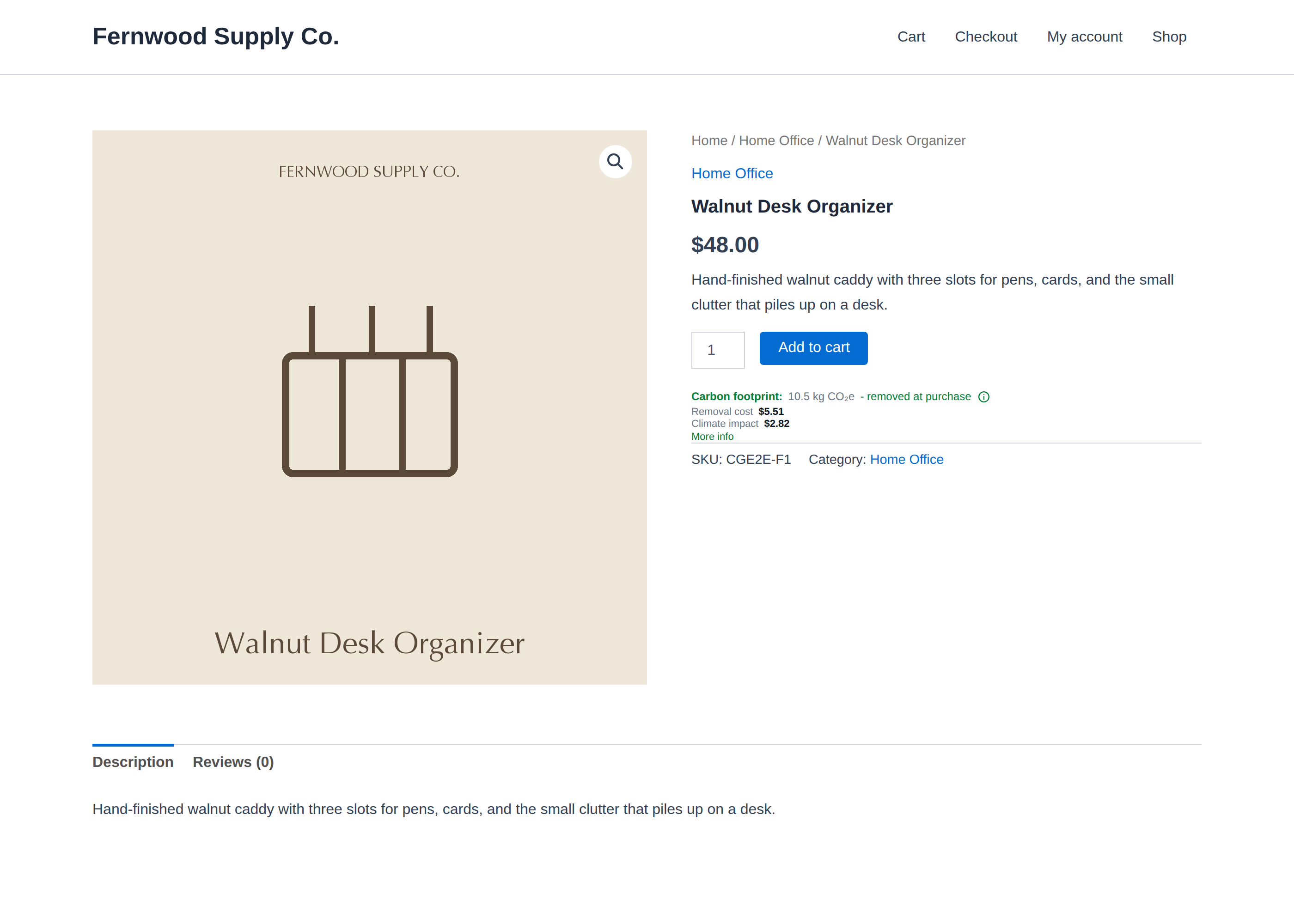
If you run a WooCommerce store, you can install it from Plugins → Add New, search for CarbonGuru Embedded Merchant Offsetting, and click Install.
CarbonGuru Embedded Merchant Offsetting on WordPress.org
This gives you a new carbon information and climate-action layer for your store: product-specific carbon footprints on the products you choose, and automatic merchant-funded offsetting or removal for the orders you choose.
Add carbon information to your products
Your store can already tell customers almost everything about a product: price, materials, specifications, availability, reviews, and delivery.
CarbonGuru adds a new information type: the product’s carbon footprint.
For each item you enable, CarbonGuru analyzes the actual product information and generates a product-specific footprint. You can display that footprint directly on the product page at the moment your customer is deciding what to buy.
You control what each card shows.
The footprint itself is always available, and you can also choose to display:
- the cost to offset the product’s footprint;
- the cost to remove it;
- the price of the alternative climate-action option;
- estimated climate impact in dollars;
- product and carbon-category details;
- how the footprint was calculated;
- the offset or removal portfolio supporting the action;
- climate-action badges that can carry through to cart and checkout.
You can keep the card simple or expose more detail. The presentation is yours to configure.
The analysis is performed at the product level. CarbonGuru is not applying a generic cart estimate or reducing the entire order to a broad spending category.
Choose exactly which products participate
You do not have to apply CarbonGuru to your entire catalog.
For every item, you can switch the footprint card on or off and switch automatic offsetting on or off independently.
That means you can:
- show carbon information without offsetting;
- offset a product without displaying a public card;
- use both together;
- use neither.
You can review, activate, deactivate, and re-analyze products one at a time or in bulk.
This gives you control over how CarbonGuru fits your catalog, your margins, and your customer experience.
Offset orders automatically, without charging your customer
You can also make climate action part of the transaction itself.
Choose the offsets or removals you want CarbonGuru to purchase from the available portfolio. You can change that choice at any time.
When an eligible WooCommerce order is paid, the plugin sends CarbonGuru the product identifiers, quantities, and order reference needed to process the order. CarbonGuru calculates the associated footprint, purchases the selected offsets or removals, and charges the payment method saved in your CarbonGuru account.
Your customer never pays.
There is no checkout surcharge, donation request, round-up prompt, or separate climate payment. Your cart and checkout remain intact.
This is a deliberate part of the model.
Instead of asking your customer to make one more decision at checkout, you can decide that climate action is simply part of what your store provides.
Turn a complex process into a store setting
There is substantial infrastructure behind this: product extraction, carbon analysis, portfolio selection, order handling, carbon-credit purchasing, billing, and recordkeeping.
You should not have to manage any of that manually.
Setup is four steps:
- Connect — Open WooCommerce → CarbonGuru, sign in to your CarbonGuru account, and accept the merchant terms. Credentials are provisioned automatically.
- Analyze — Select the products you want CarbonGuru to analyze. Nothing is analyzed or charged without your confirmation.
- Review and configure — Review each footprint, choose what each card displays, and switch cards and offsetting on or off for each product.
- Automate — Choose your offset or removal portfolio and turn on automatic processing for paid orders.
There are no API keys to copy, webhooks to create, templates to edit, or code snippets to maintain.
The plugin supports both block and classic themes, and you can choose where the footprint card appears relative to the add-to-cart button.
Add carbon information without adding customer surveillance
CarbonGuru is designed to add useful information and climate action to commerce without turning your customers into a data source.
The plugin does not add scripts to cart or checkout and does not set cookies for shoppers.
CarbonGuru does not receive customer names, email addresses, postal addresses, or other personal information when an order is reported.
For order processing, CarbonGuru receives only the information required to perform the service: product identifiers, quantities, and an order reference.
Your customer remains your customer.
This works beyond WooCommerce
The WordPress plugin makes the WooCommerce setup especially simple, but the underlying CarbonGuru Commerce model is platform-independent.
If you run any B2C or B2B store, marketplace, product catalog, or other commerce surface, you can use CarbonGuru to embed:
- product-specific carbon footprints;
- automatic offsetting or removal;
- or both.
You choose which products participate, which carbon-information fields customers see, which offset or removal portfolio you use, and whether you want CarbonGuru for information, climate action, or both.
The same model works across consumer retail, B2B commerce, marketplaces, catalogs, and other product and order workflows.
Why this is different
Most commerce climate tools start at checkout and ask the customer to fund the action.
CarbonGuru starts with the product.
You can add product-specific carbon information before the transaction, while your customer is still evaluating what to buy. You can then make climate action part of the order automatically, funded by you rather than added as another customer decision.
That creates a different kind of commerce experience.
Carbon information becomes part of the product itself.
Climate action becomes part of how you operate.
And because the underlying analysis and offsetting costs are low, you can make that model practical across ordinary products rather than reserving it for a small premium category.
See it working
The CarbonGuru Commerce demo shows the system running on a live storefront with dozens of real-world products.
You can see the configurable footprint cards, product-specific carbon information, and merchant-funded offsetting workflow before installing anything.
CarbonGuru Embedded Merchant Offsetting requires WooCommerce 8.0+, a USD-denominated store, and a CarbonGuru Plus, Pro, or Prime account.
Not using WooCommerce? You can use the same CarbonGuru product-footprint and merchant-funded climate-action capabilities in other stores, marketplaces, catalogs, and order workflows through the CarbonGuru embed.
If you do not have a CarbonGuru account yet, get started here.