
Embedded Offsetting
Display product carbon footprints throughout your store and automatically fund matching offsets when customers buy. CarbonGuru connects your catalog, paid orders, and verified climate action, making your sustainability commitment visible on the products you sell.
Already a customer? Open Embedded Offsetting →
What will my customers see?
Your climate action, visible at purchase
Each active product can display a footprint card showing its carbon footprint in kg CO₂e. For products covered by automatic offsetting, the card also identifies your store’s commitment to offset the footprint at purchase.
Optional details include the offset or removal cost, estimated climate impact in dollars, calculation method, and portfolio your store supports. Enable the information you want customers to see; these additional details are off by default.
The card adopts your theme’s fonts and colors. Compact product tiles extend the display to category, pricing, and landing pages. Checkout descriptions can carry a footprint line beneath each item.
The display loads after the page, sets no cookies, and collects no customer-entered text. Customers continue through your existing checkout.

How does it work?
Product footprints and automatic offsets across your catalog
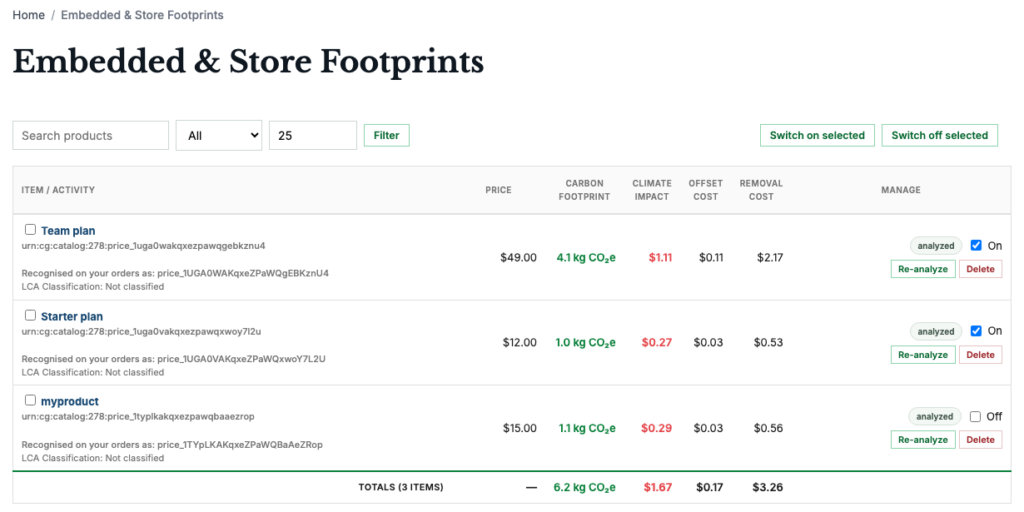
- CarbonGuru analyzes your catalog and calculates each product’s footprint.
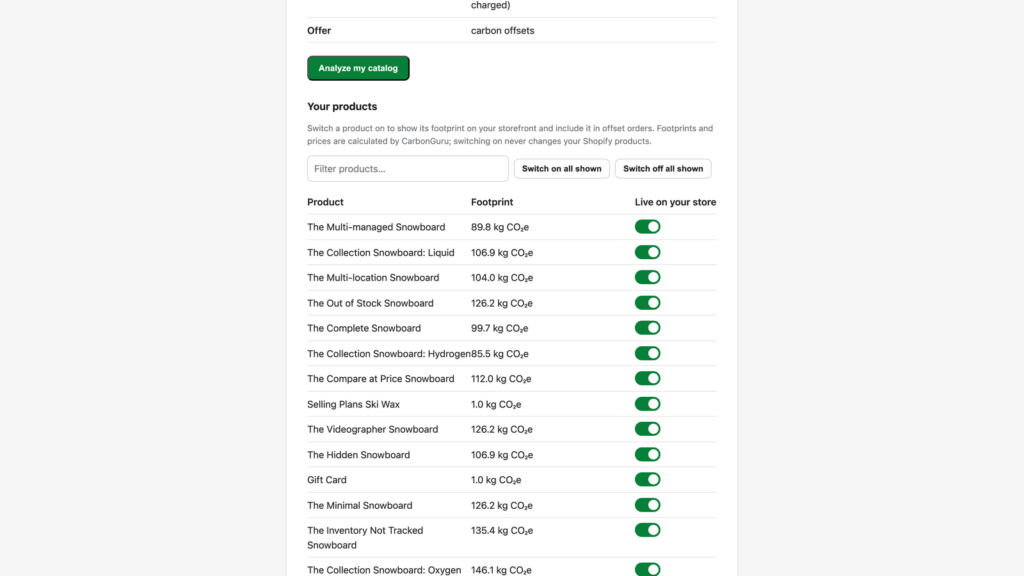
- You choose which products show a footprint and which are offset.
- A customer pays, and your store tells CarbonGuru which products were bought.
- CarbonGuru buys the matching offsets or removals for the products and quantities purchased.
CarbonGuru calculates purchaser carbon footprints from your existing product information, including products from other brands. You can cover your catalog without collecting manufacturer lifecycle data or researching each supplier’s production process.
CarbonGuru calculates footprints using your store’s country and product prices. Submit catalog prices in the currency associated with that country. CarbonGuru flags and skips catalog rows priced in another currency.
Display and automatic offsetting work independently: use either one, or both.
Order matching uses your catalog, product IDs, quantities, order number, and currency. It does not require customer names, contact information, or payment details.
What does it cost, and who pays?
Merchant-funded offsetting
Your business pays for the climate action. Your customers pay nothing extra.
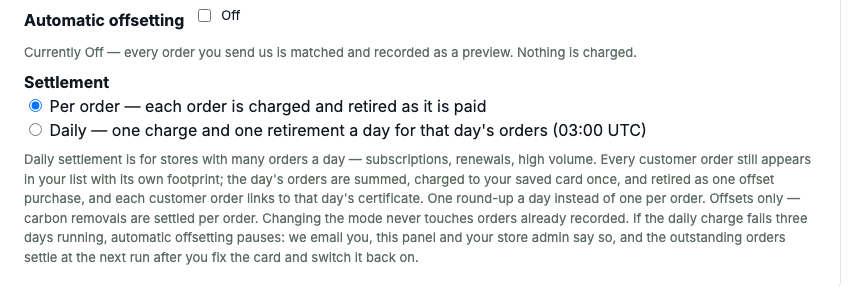
After a customer pays, CarbonGuru charges your saved payment method for the matching offsets or removals.
Embedded Offsetting is included with a paid CarbonGuru plan; carbon purchases are additional. Your account shows the available portfolios and prices before you enable automatic purchases.
Your plan determines the available analysis and catalog capacity, shared with other analyses you run through your account. Choose a plan for the catalog you want to cover and the analysis volume you expect. The pricing page lists current allowances and purchase-based capacity resets.
Paid orders can use other currencies. CarbonGuru charges subscriptions and carbon purchases in US dollars.
Can I try it first?
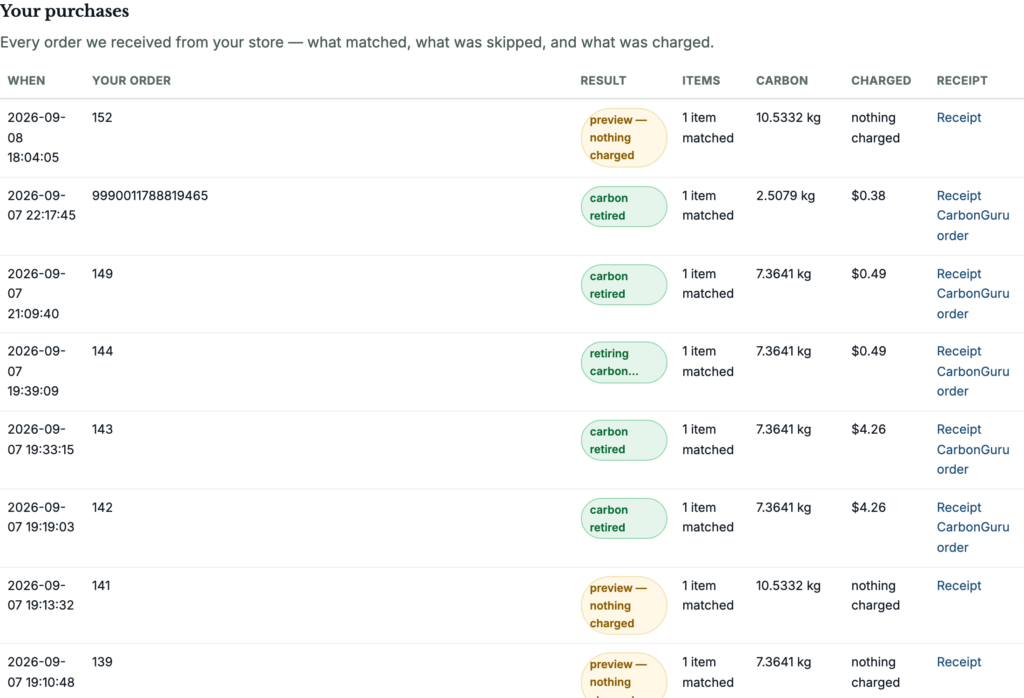
Preview first, then track every order
Trying Embedded Offsetting on your own catalog needs a CarbonGuru account on Plus ($5/month) or higher. No offsets are bought until you turn automatic offsetting on.
Review the footprints and choose which products participate before activating them.
Preview orders show which products matched and how much carbon they carry, and your panel shows each product’s offset cost, without buying any credits. Turn on automatic offsetting when you are ready, and CarbonGuru starts buying offsets for paid orders. Test-mode orders always stay previews.
Send a test order before launch to confirm that CarbonGuru receives it and recognizes the products. After activation, use the same log to review processing results and offset charges.
You can pause automatic offsetting or switch individual products off at any time.
How do I set it up?
Set up on your platform
Pick your platform.
Jump to: WooCommerce · Shopify · Stripe · PayPal and other checkouts · Any storefront
WooCommerce integration
Install CarbonGuru Embedded Merchant Offsetting from the WordPress plugin directory. Open WooCommerce → CarbonGuru and connect your account. The plugin manages the connection and places footprint cards on your product pages.
Submit your catalog for analysis, then activate the products you want to include. The WooCommerce Products list provides Activate, Deactivate, Re-analyze, and Remove actions. You can also manage products from your CarbonGuru panel.
Enable footprint tiles under Display to add them to shop and category pages.
The plugin sends paid orders to CarbonGuru automatically.

Shopify integration
The CarbonGuru Offsetting app connects your catalog and paid orders to CarbonGuru. The Shopify App Store listing is under review; email support@carbonguru.io for an installation link.
Connect your CarbonGuru account, analyze your catalog, and select participating products. Add footprint blocks to product pages and collection grids through Shopify’s theme editor, and enable the app embed for footprints in the cart.
In Shopify’s checkout editor, add blocks to the Thank you and Order status pages. Shopify Plus stores can also show footprints inside checkout.
The app sends paid orders to CarbonGuru automatically.
Stripe integration
Install the CarbonGuru Offsetting app from the Stripe App Marketplace. It reads your Stripe products and prices, calculates a footprint for each, and writes one footprint line into the descriptions Stripe shows on hosted Checkout, Payment Links, the customer portal and invoices, for products sold at a single price.
The app offsets every paid invoice and completed Checkout Session automatically. That covers any business that bills through Stripe, including Stripe Invoicing and Stripe Billing subscriptions, not only online stores.
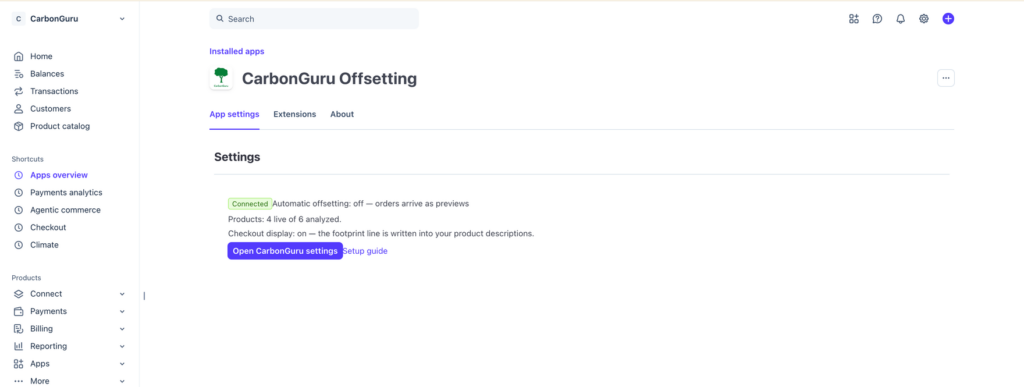
Manual route: footprints in PayPal and Stripe checkout
This is the manual route for PayPal Checkout, and for Stripe stores that don’t use the app. Stripe app users can skip it: the app writes these lines and connects paid orders for you.
You can include footprint information in the item descriptions shown by Stripe Checkout, Stripe Payment Links, and PayPal Checkout.
Your CarbonGuru panel generates a description line for each active product, matched to its product ID. Include that line in the description your integration sends to checkout. For Stripe Payment Links, you can add it directly to the product description in your Stripe Dashboard.
Copy individual descriptions or export them together as a CSV. CarbonGuru also accepts Stripe product exports and retains the product IDs needed to match subsequent orders.
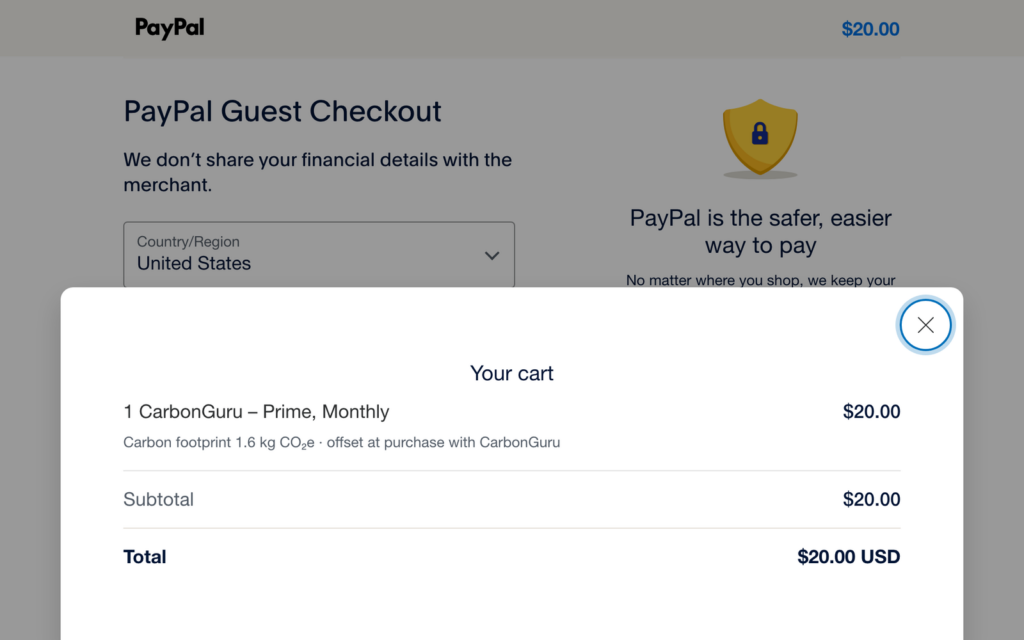
Add footprints to any storefront
Use CarbonGuru’s embed code on custom stores, headless sites, and platforms without a native integration.
Open Embedded Offsetting in your CarbonGuru account. Copy the snippet generated for your store into your product template:
<script src="https://carbonguru.io/embed.js" data-cg-merchant="mk_live_…" async></script>Add the snippet once to your product template to show footprint cards on every product page. Your panel also provides tile code for individual products on category, pricing, and landing pages.
You can install the code before activating any products. CarbonGuru displays cards only for products you have analyzed and enabled.
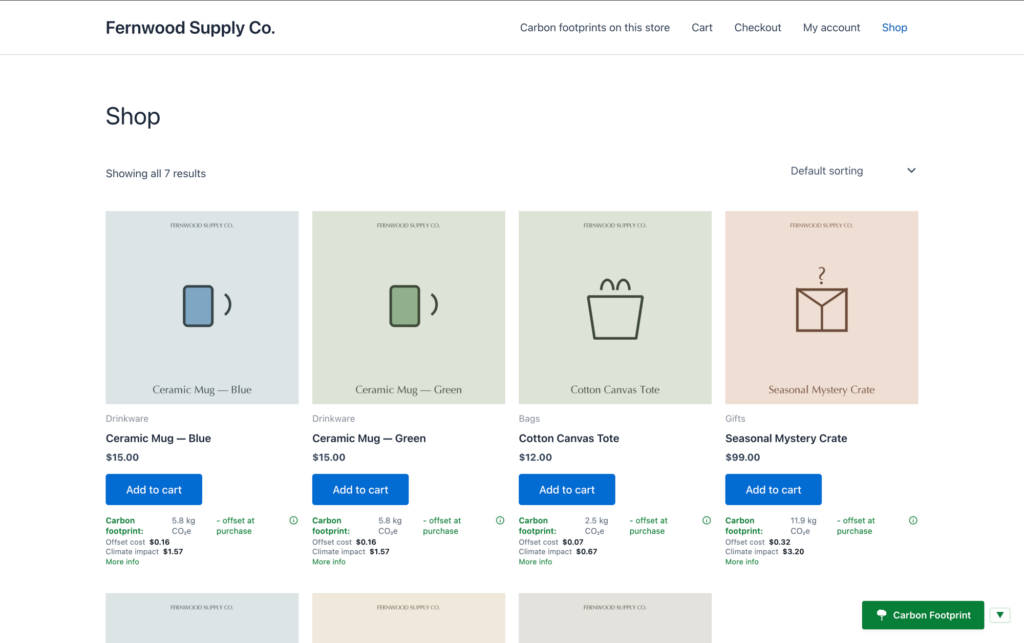
Connect paid orders to automatic offsets
The snippet and checkout lines handle the display. For these stores and custom integrations, connect paid orders with one of three methods:
- Order-confirmation email. Add your CarbonGuru address as a BCC recipient. CarbonGuru extracts the order number and purchased items from the verified message.
- Zapier or Make. Connect a paid-order event from your store to CarbonGuru.
- API. Send product IDs and quantities to the order endpoint in your panel. The panel provides the endpoint and a sample request for your account.
Subscription payments can trigger offsetting on the initial purchase and subsequent renewals.
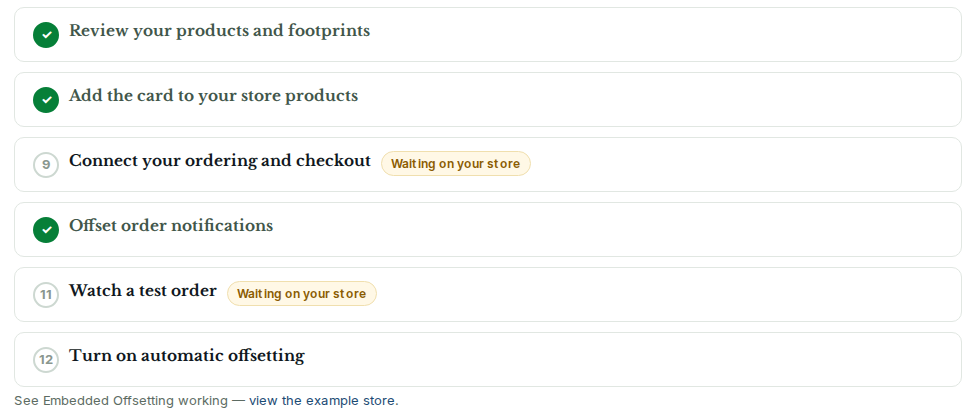
Already a customer? Open Embedded Offsetting →
Connect your store
Analyze your catalog, select participating products, and preview your orders. Turn on automatic offsetting when you are ready to make matching climate action part of each sale.